
In this guide
LOCALTR / DOCS
Inspect and edit a webhook replay
Review requests and responses safely, replay from the detail panel and account for redacted credentials.
- Environment
- Installed LocalTR · test target without real side effects
- Evidence scope
- Explanatory app guide; check the steps separately on your installed Mac release.
- Expected outcome
- Compare actual detail-panel Replay requests and responses; validate export compatibility separately with the package.
Prepare
Run your own test endpoint. Do not use an operation that creates a real payment, email or order as the test target. A webhook is an HTTP notification from another system to your app. Your application remains responsible for validating the provider's signature.
Inspect and replay
- Send a sample request to your test endpoint using a local or eligible public URL.
- Open the request in the traffic list. Review the method, path, status, duration, headers and body alongside its response.
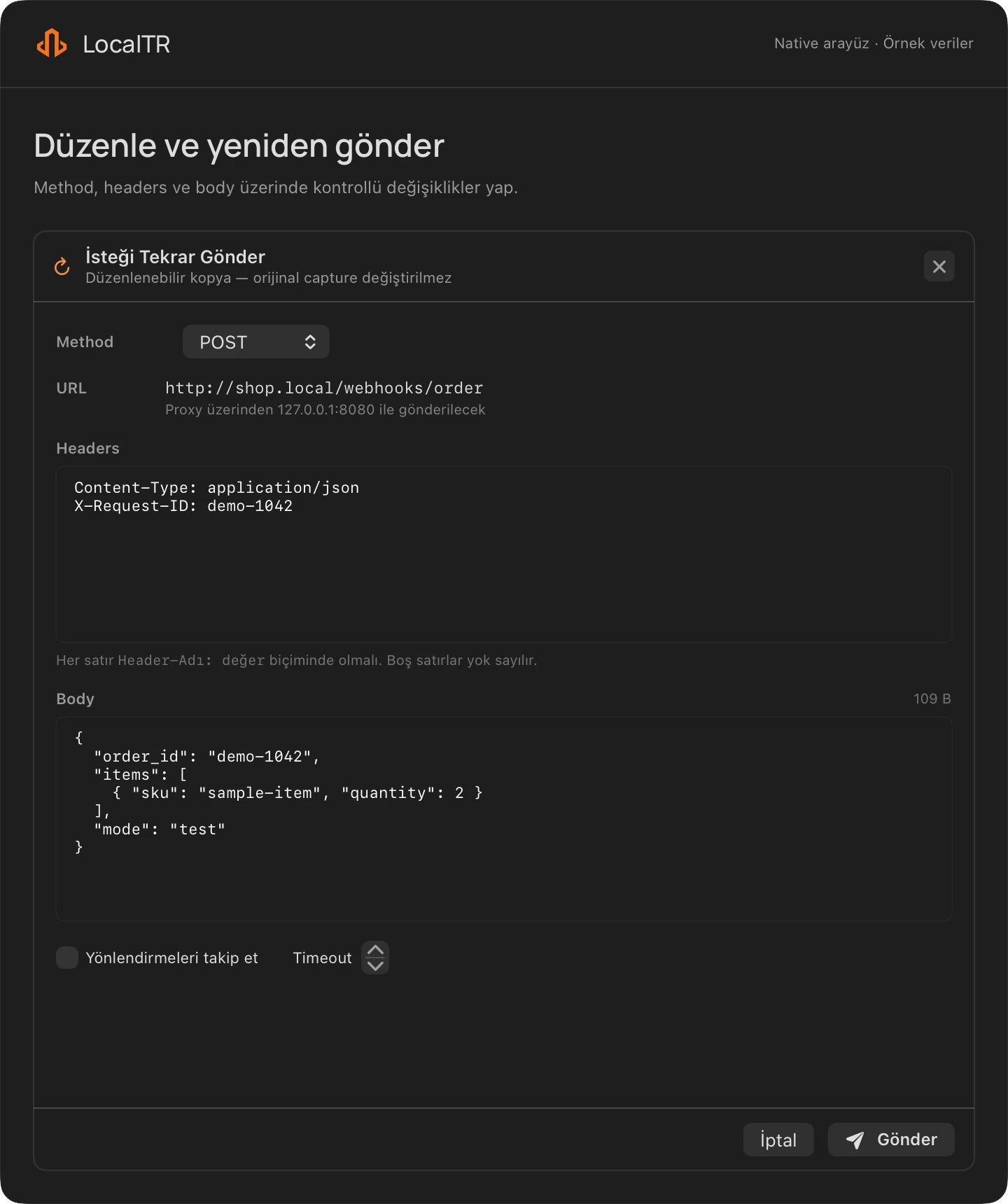
- Open Replay in the request detail panel. Check the target, headers and body; send only after making the intended changes.
- Compare the new capture with the original response. Replay sends a real HTTP request and can cause side effects in the target application.
{"event":"demo.updated","id":"example-001","mode":"test"}
Credentials and limits
Selected headers such as Authorization and Cookie, plus some JSON/form fields, are redacted in the stored copy. Query parameters and free text are not guaranteed to be cleared of secrets. A masked key does not reappear during replay. An edited body may no longer match the provider's original signature; do not disable production signature checks.
Replay and export scope
The request detail panel is the actual Replay path; the list context menu Replay is not a completed sending path. The reviewed development source contains paths for copying cURL and generating Postman JSON from the list menu. That does not establish complete or compatible export in a published Mac package; output and target-tool compatibility require separate checks with that package. The detail panel's Postman action is not a completed integration.
Review output for secrets, redacted fields and missing bodies first. Separately verify a Postman import or cURL command only against your own controlled test target; execution can send a real request. A successful copy does not establish successful import or delivery.
Expected result
The new request produces a new response from your controlled test target. A missing body may be truncated or affected by storage limits. The inspector is not an unlimited archive: the implementation sets a 10,000-record limit and restores up to 1,000 records on startup. Keep a redacted copy of necessary evidence in time; separately verify that export output contains the required fields and opens in the target tool.
Does a step look different?
Contact support with your app version